Point Helper - Kotlin SDK
This example show how to render point features as circles with clustering and labels.
The vector layer helpers take your data and styling options and create the right source + layers on the current map style with minimal code. Helpers normalize sensible defaults like zoom range, outlines, etc. so you can get results quickly.
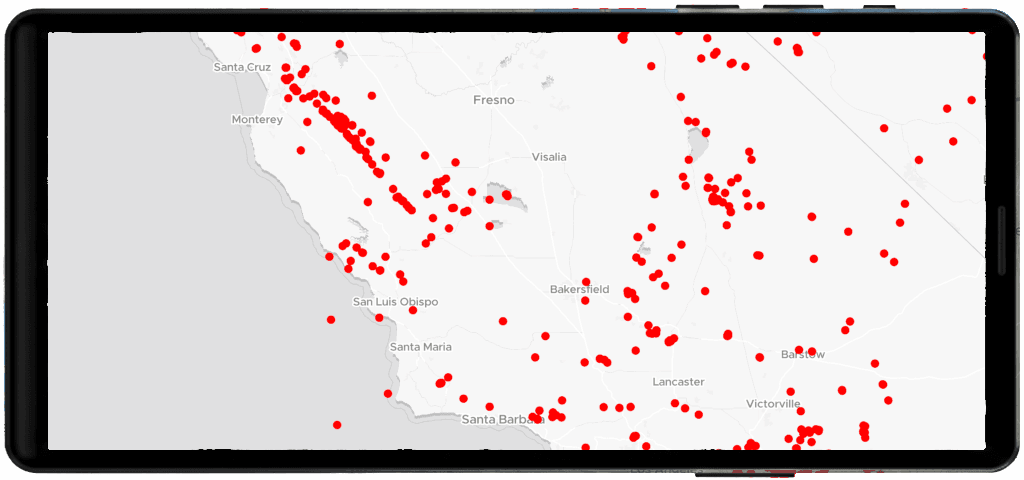
Basic flow
This example show how to render point features as circles
import com.maptiler.maptilersdk.map.MTMapView
import com.maptiler.maptilersdk.map.MTMapOptions
import com.maptiler.maptilersdk.map.MTMapViewController
import com.maptiler.maptilersdk.map.style.MTMapReferenceStyle
import com.maptiler.maptilersdk.helpers.MTPointLayerOptions
import com.maptiler.maptilersdk.helpers.MTPointLayerHelper

// After your MTMapView is on screen (Compose example)
val controller = MTMapViewController(context)
MTMapView(
    referenceStyle = MTMapReferenceStyle.DATAVIZ,
    options = MTMapOptions(),
    controller = controller,
)

// 1) Get the style once available
controller.style?.let { style ->
    // 2) Pick the helper for your geometry type
    val pointHelper = style.pointHelper()
    // 3) Provide data + options
    val options = MTPointLayerOptions(
        data = "https://docs.maptiler.com/sdk-js/assets/earthquakes.geojson",
        pointColor = "#1e90ff",
        pointRadius = 6.0,
        outline = true,
        outlineColor = "white",
        outlineWidth = 1.0,
    )
    // 4) Add the layer
    pointHelper.addPoint(options)
}
Points with clustering and labels
import com.maptiler.maptilersdk.map.MTMapView
import com.maptiler.maptilersdk.map.MTMapOptions
import com.maptiler.maptilersdk.map.MTMapViewController
import com.maptiler.maptilersdk.map.style.MTMapReferenceStyle
import com.maptiler.maptilersdk.helpers.MTPointLayerOptions
import com.maptiler.maptilersdk.helpers.MTPointLayerHelper

// After your MTMapView is on screen (Compose example)
val controller = MTMapViewController(context)
MTMapView(
    referenceStyle = MTMapReferenceStyle.DATAVIZ,
    options = MTMapOptions(),
    controller = controller,
)

// 1) Get the style once available
controller.style?.let { style ->
    val helper = style.pointHelper()
    // Simple points
    val points = MTPointLayerOptions(
        data = "https://docs.maptiler.com/sdk-js/assets/earthquakes.geojson",
        pointColor = "#1e90ff",
        pointRadius = 6.0,
        pointOpacity = 0.9,
        outline = true,
        outlineColor = "white",
        outlineWidth = 1.0,
    )
    helper.addPoint(points)
    // With labels and clustering
    val clustered = MTPointLayerOptions(
        data = "https://docs.maptiler.com/sdk-js/assets/earthquakes.geojson",
        cluster = true,
        showLabel = true,
        labelColor = "#111111",
    )
    helper.addPoint(clustered)
}
Learn more
Check the MTPointLayerHelper reference to understand how to create and manage point layers.
Review MTPointLayerOptions to explore all available configuration options.


